jQuery基础
选择元素
sample
<
$(document).ready(function() {
  $('#selected-plays > li').addClass('horizontal'); // Find First top li elements ,add css horizontal
  $('#selected-plays li:not(.horizontal)').addClass('sub-level'); //Find all li elements without class horizontal

  $('a[href^="mailto:"]').addClass('mailto');//Find anchor element that href begin with "mailto"
  $('a[href$=".pdf"]').addClass('pdflink');//href end with ".pdf"
  $('a[href^="http"][href*="henry"]').addClass('henrylink');//href begin with "http" and has "henry"

  $('a').filter(function() {  //filter the hostname
    return this.hostname && this.hostname != location.hostname;
  }).addClass('external');

  $('tr:nth-child(odd)').addClass('alt');  //select all odd child by current parent,start with 1.
  $('td:contains(Henry)') // Find every cell containing "Henry"
    .parent() // Select its parent
    .find('td:eq(1)') // Find the 2nd descendant cell
    .addClass('highlight') // Add the "highlight" class
    .end() // Return to the parent of the cell containing "Henry"
    .find('td:eq(2)') // Find the 3rd descendant cell
    .addClass('highlight'); // Add the "highlight" class
});
给位于嵌套列表第二个层次的所有<li>元素添加special类;
$(document).ready(function() {
  $('#selected-plays li li').addClass('special');
});
给位于表格第三列的所有单元格添加year类;
$(document).ready(function() {
  $('td:nth-child(3)').addClass("year")
});
为表格中包含文本Tragedy的第一行添加special类;
$(document).ready(function() {
  $('td:contains(Tragedy)').first().addClass('special');
});
选择包含链接(<a>)的所有列表项(<li>元素),为每个选中的列表项的同辈列表项元素添加afterlink类;
$(document).ready(function() {
  <span style="font-family: monospace; white-space: pre; background-color: rgb(240, 240, 240);">$('li a').parent().nextAll().addClass('afterlink')</span>;
});
为与.pdf链接最接近的祖先元素
添加tragedy类
$(document).ready(function() {
  $('a[href$=".pdf"]').closest('ul').addClass('Tragedy');;
});
事件
tips:事件冒泡
1.特定元素响应事件需要停止事件传播[.stopPropagation()] 2.部分事件处理对象,如锚元素(),需要阻止默认操作[.preventDefault()] 3.利用事件冒泡实现事件委托
分析和练习
$(document).ready(function() {
  /*Enable hover effect on the style switcher*/
  $('#switcher').hover(function() {
    $(this).addClass('hover');
  }, function() {
    $(this).removeClass('hover');
  });//绑定悬停效果,在鼠标enters和leaves元素时启用对应样式

  /*Allow the style switcher to expand and collapse.*/
  var toggleSwitcher = function(event) {
    if (!$(event.target).is('button')) {
      $('#switcher button').toggleClass('hidden');
    }
  };//是否包含button标签,toggleClass根据类是否存在而添加或删除类
  $('#switcher').on('click', toggleSwitcher);//注册click事件

  /* Simulate a click so we start in a collaped state.*/
  $('#switcher').click();

  /* The setBodyClass() function changes the page style.
     The style switcher state is also updated.*/
  var setBodyClass = function(className) {
    $('body').removeClass().addClass(className);

    $('#switcher button').removeClass('selected');
    $('#switcher-' + className).addClass('selected');

    $('#switcher').off('click', toggleSwitcher);

    if (className == 'default') {
      $('#switcher').on('click', toggleSwitcher);
    }
  };

  /*begin with the switcher-default button "selected"*/
  $('#switcher-default').addClass('selected');

  /*Map key codes to their corresponding buttons to click*/
  var triggers = {
    D: 'default',
    N: 'narrow',
    L: 'large'
  };

  // Call setBodyClass() when a button is clicked.
  $('#switcher').click(function(event) {
    if ($(event.target).is('button')) {
      var bodyClass = event.target.id.split('-')[1];
      setBodyClass(bodyClass);
    }
  });

  // Call setBodyClass() when a key is pressed.
  $(document).keyup(function(event) {
    var key = String.fromCharCode(event.which);
    if (key in triggers) {
      setBodyClass(triggers[key]);
    }
  });

  /*Enable hover effect on the style switcher*/
  $('#header div').hover(function() {
    $(this).addClass('hover');
  }, function() {
    $(this).removeClass('hover');
  });

  //(1) 在Charles Dickens被单击时,给它应用selected样式
  $('#header div').click(function(event) {
      $('#header div').removeClass().addClass('selected');
  });

  //(2) 双击章标题(<h3 class="chapter-title">)时,切换章文本的可见性
  $('div.chapter').click(function(event) {
    if ($(event.target).is('h3')) {
        $(event.target).parent().find('p').toggleClass('hidden');
    }
  });
  //(3) 用户按下向右方向键时,切换到下一个body类
  $(document).keyup(function(event) {
    if (event.keyCode == 39)
    {
      var curBodyClass=$('body').attr('class');
      switch(curBodyClass)
      {
        case 'default':
          setBodyClass('narrow');
          break;
        case 'narrow':
          setBodyClass('large');
          break;
        case 'large':
          setBodyClass('default');
          break;
        default:
          setBodyClass('narrow');
          break;
      }
    }
  });
  /*(4) 使用console.log()函数记录在段落中移动的鼠标的坐标位置。(注意:console.log()
    可以在Firefox的firebug扩展、Safari的Web Inspector或Chrome、IE中的Developer Tools中使
    用。*/
  $('p').mousemove(function(e){
    console.log("mouseXY:"+ e.pageX+","+ e.pageY);
  });

  /*(5) 使用.mousedown()和.mouseup()跟踪页面中的鼠标事件。如果鼠标按键在按下
  它的地方被释放,则为所有段落添加hidden类。如果是在按下它的地方之下被释放的,
  删除所有段落的hidden类。*/
  var mousedownY
  $(document).mousedown(function(e){
    mousedownY = e.pageY
  });
  $(document).mouseup(function(e){
    console.log("mousedownY:"+ mousedownY+","+ e.pageY);
    if (e.pageY == mousedownY){
        $('p').addClass('hidden');
    }
    else if (e.pageY > mousedownY){
    $('p').removeClass('hidden')
    }
  });
});
样式和动画
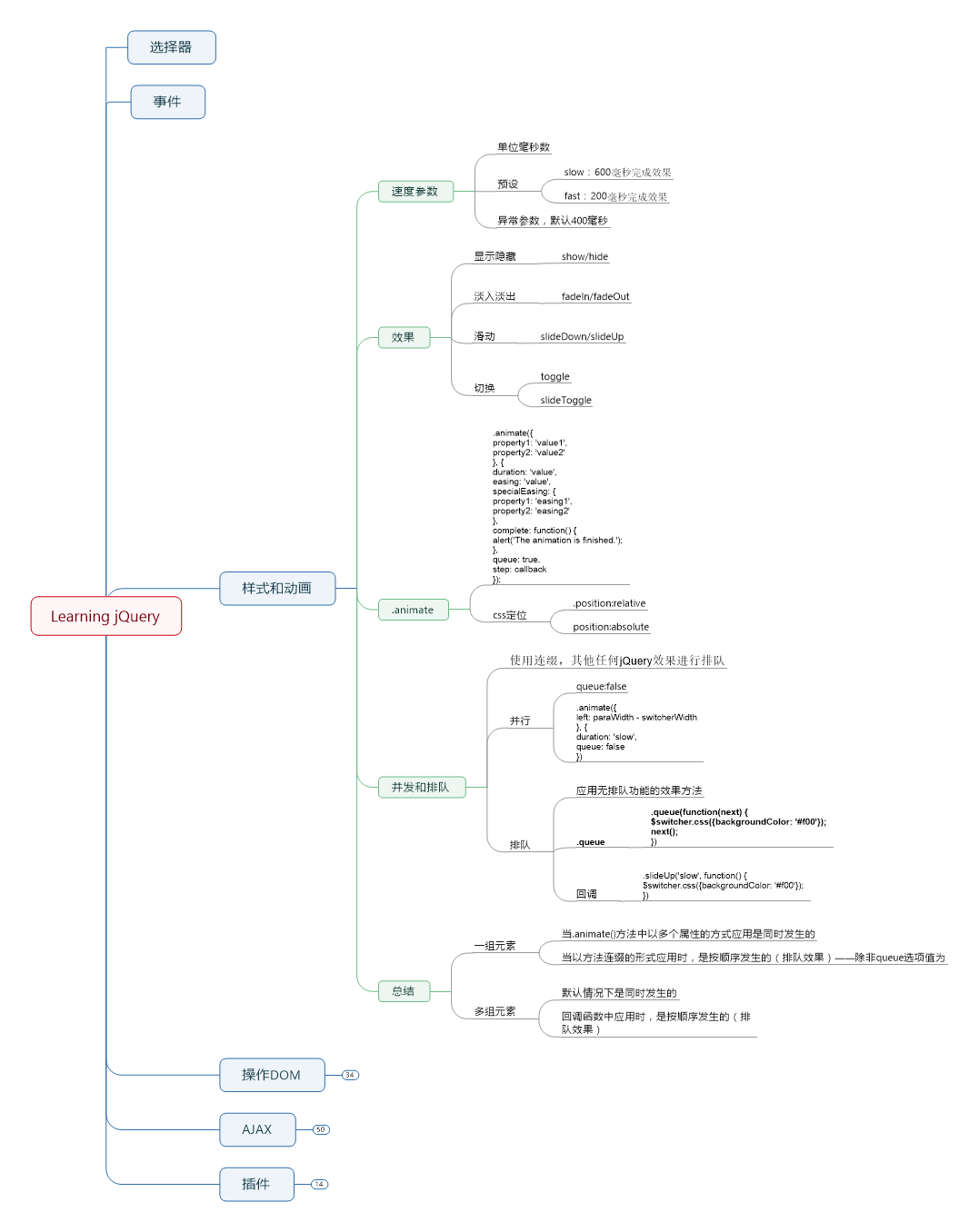
1.position:relative; 相对定位,元素”相对于”它的原始起点进行移动。(相对定位时,无论是否进行移动,元素仍然占据原来的空间。因此,移动元素会导致它覆盖其他框)。 2.position:absolute; 绝对定位,位置将依据浏览器左上角开始计算。 3.父容器使用相对定位,子元素使用绝对定位后,子元素的位置相对于父容器左上角。 4.相对定位和绝对定位需要配合top、right、bottom、left使用来定位具体位置。这四个属性同时只能使用相邻的两个,即上和下,左和右不能同时使用。
code view&课后练习:
$(document).ready(function() {
  var $speech = $('div.speech');
  var defaultSize = $speech.css('fontSize');
  $('#switcher button').click(function() {
    var num = parseFloat($speech.css('fontSize'));
    switch (this.id) {
      case 'switcher-large':
        num *= 1.4;
        break;
      case 'switcher-small':
        num /= 1.4;
        break;
      default:
        num = parseFloat(defaultSize);
    }
    $speech.animate({fontSize: num + 'px'}, 'slow');
  });//switch button function--larg/small speech

  var $firstPara = $('p').eq(1);
  $firstPara.hide();
  $('a.more').click(function() {
    $firstPara.animate({
      opacity: 'toggle',
      height: 'toggle'
    }, 'slow');
    var $link = $(this);
    if ($link.text() == 'read more') {
      $link.text('read less');
    } else {
      $link.text('read more');
    }
    return false;
  });//展开/隐藏,注意toggle的使用

  $('div.label').click(function() {
    var paraWidth = $('div.speech p').outerWidth();
    var $switcher = $(this).parent();
    var switcherWidth = $switcher.outerWidth();
    $switcher
      .css({position: 'relative'})
      .fadeTo('fast', 0.5)
      .animate({
        left: paraWidth - switcherWidth
      }, {
        duration: 'slow',
        queue: false
      })
      .fadeTo('slow', 1.0)
      .slideUp('slow', function() {
        $switcher.css({backgroundColor: '#f00'});
      })
      .slideDown('slow');
  });//多效果并行和队列

  $('p').eq(2)
    .css('border', '1px solid #333')
    .click(function() {
      var $clickedItem = $(this);
      $clickedItem.next().slideDown('slow', function() {
        $clickedItem.slideUp('slow');
      });
    });//回调机制,实现队列效果
  $('p').eq(3).css('backgroundColor', '#ccc').hide();

  /*1) 修改样式表,一开始先隐藏页面内容,当页面加载后,慢慢地淡入内容*/
  $('#container').hide();
  $('#container').fadeIn("slow");
  /*(2) 在鼠标悬停到段落上面时,给段落应用黄色背景*/
  var rgb = $('p').css('backgroundColor');
  $('p').hover(function() {
    $(this).css({backgroundColor:'#FFFF00'});
  },function(){
    $(this).css({backgroundColor:rgb})
  });
  /*(3)单击标题(<h2>)使其不透明度变为25%,同时添加20px的左外边距,当这两个效果完
  成后,把讲话文本变成50%的不透明度;*/
  $('h2').click(function() {
    $(this)
      .animate({
        opacity:0.25,
        marginLeft: "20px"  //左外距
      });
      $('div.speech p').fadeTo('slow',0.5);
  });
  /*(4)按下方向键时,使样式转换器向相应的方向平滑移动20像素*/
  $(document).keyup(function(event) {
    $('#switcher').css({position:'relative'});
    $switcher = $('#switcher')
    switch (event.keyCode){
      case 37:
        $switcher.animate({
          left:"-=20px"
        });
        break;
      case 38:
        $switcher.animate({
          top:"-=20px"
        });
        break;
      case 39:
        $switcher.animate({
          left:"+=20px"
        });
        break;
      case 40:
        $switcher.animate({
          top:"+=20px"
        });
        break;
      default:
        break;
    }
  });
});
DOM操作
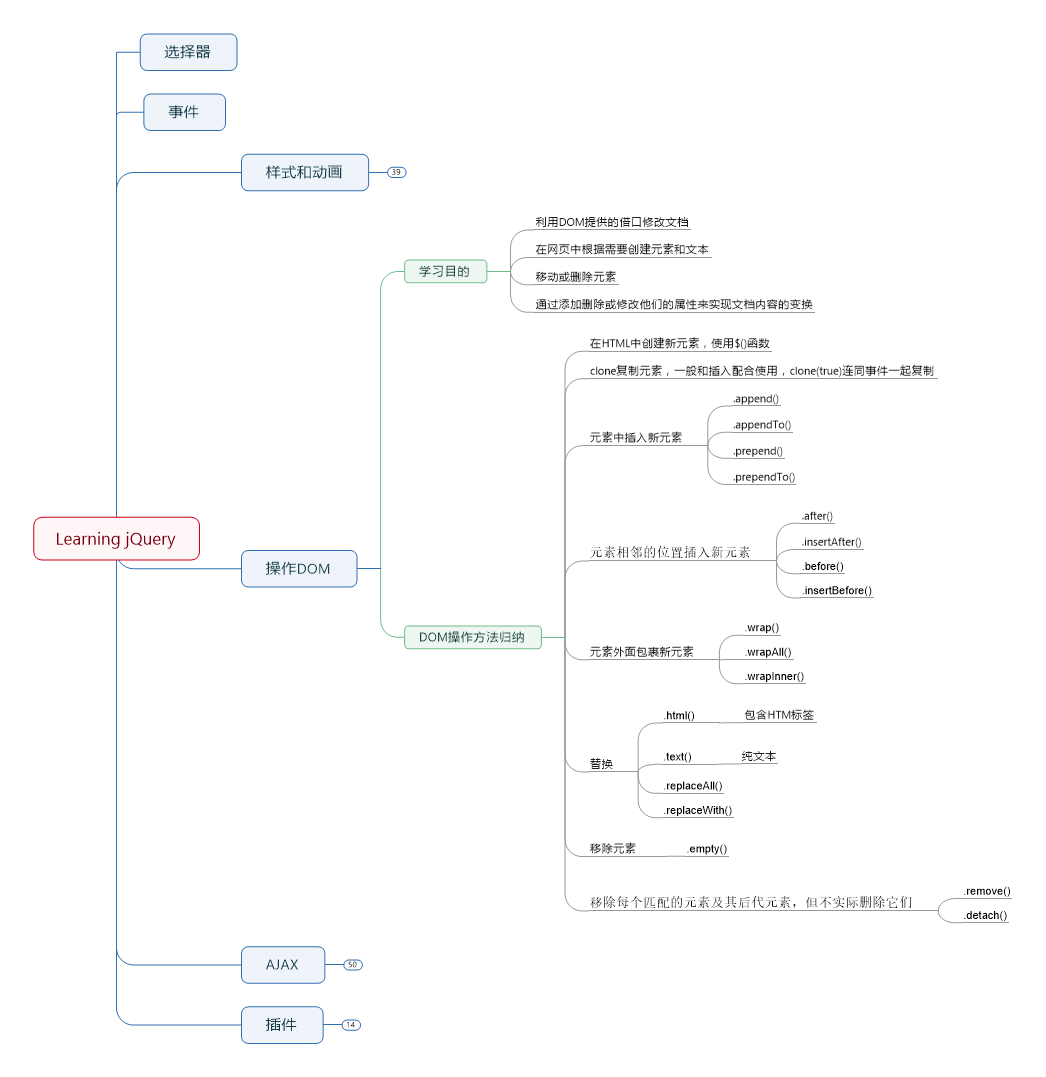
code view和练习:
$(document).ready(function () {
 // Use attr() to add an id, rel, and title.
 $('div.chapter a[href*="wikipedia"]').attr({
   rel : 'external',
   title : function () {
     return 'Learn more about ' + $(this).text() + ' at Wikipedia.';
   },
   id : function (index, oldValue) {
     return 'wikilink-' + index;
   }
 });

 // Add "back to top" links.
 //(1) 修改添加back to top链接的代码,以便这些链接只从第四段后面才开始出现
 $('<a href="#top">back to top</a>').insertAfter('div.chapter p:gt(2)');
 $('<a id="top"></a>').prependTo('body');
 //(2) 在单击back to top链接时,为每个链接后面添加一个新段落,其中包含You were here字样。确保链接仍然有效。
 $('.chapter a[href*="top"]').click(function () {
   $('<p>you were here</p>').insertAfter($(this));
 });
 //(3) 在单击作者名字时,把文本改为粗体(通过添加一个标签,而不是操作类或CSS属性)。
 //(4) 在随后单击粗体作者名字时,删除之前添加的<b>元素(也就是在粗体文本与正常文本之间切换)。
 $('#f-author').click(function () {
   if ($(this).parent().is('b')) {
     $(this).unwrap('111');
   } else {
     $(this).wrap('<b></b>');
   }
 });
 //(5) 为正文中的每个段落添加一个inhabitants类,但不能调用.addClass()方法。确保不影响现有的类。
 $('div.chapter p').wrapInner('<div class="inhabitants"></div>');

 // Create footnotes.
 var $notes = $('<ol id="notes"></ol>').insertBefore('#footer'); //fooer之前创建插入有序列表
 $('span.footnote').each(function (index) { //遍历脚注,使用each的回调函数处理
   $(this)
   .before([
       '<a href="#footnote-',
       index + 1,
       '" id="context-',
       index + 1,
       '" class="context">',
       '<sup>',
       index + 1,
       '</sup></a>'
     ].join('')) //创建了一个包含指向脚注的链接和脚注编号的<sup>元素,insertBefore反向插入正文,
   .appendTo($notes) //将footnote加入到脚注
   .append([
       ' (<a href="#context-',
       index + 1,
       '">context</a>)'
     ].join('')) //创建指向上文脚注标签
   .wrap('<li id="footnote-' + (index + 1) + '"></li>'); //warp 将匹配元素包裹在元素或内容中
 });

 // Style pull quotes.
 $('span.pull-quote').each(function (index) {
   var $parentParagraph = $(this).parent('p');
   $parentParagraph.css('position', 'relative'); //设置css样式相对定位

   var $clonedCopy = $(this).clone(); //复制
   $clonedCopy
   .addClass('pulled')
   .find('span.drop')
   .html('…') //修改
   .end()
   .text($clonedCopy.text()) //将text内容存文本化
   .prependTo($parentParagraph);
 });
});
AJAX
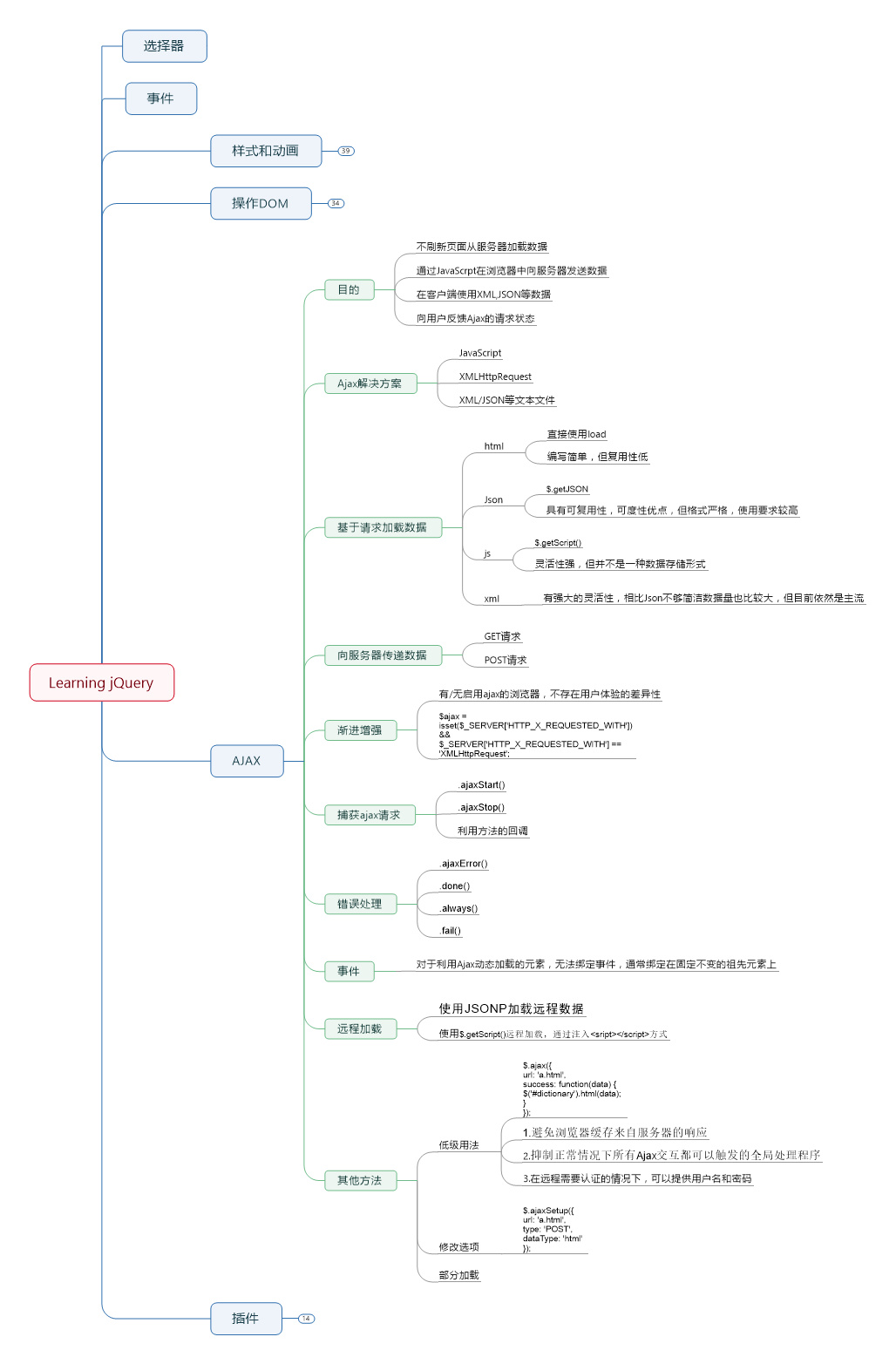
code view和练习
$(document).ready(function () {
  $('#letter-a a').click(function (event) {
    event.preventDefault();

    $.ajaxSetup({
      url : 'a.html',
      type : 'POST',
      dataType : 'html'
    });

    $.ajax({
      type : 'GET',
      success : function (data) {
        $('#dictionary').html(data);
      }
    });
  });

  $('#letter-b a').click(function (event) {
    event.preventDefault();
    $.getJSON('b.json', function (data) {
      var html = '';
      $.each(data, function (entryIndex, entry) {
        html += '<div class="entry">';
        html += '<h3 class="term">' + entry.term + '</h3>';
        html += '<div class="part">' + entry.part + '</div>';
        html += '<div class="definition">';
        html += entry.definition;
        if (entry.quote) {
          html += '<div class="quote">';
          $.each(entry.quote, function (lineIndex, line) {
            html += '<div class="quote-line">' + line + '</div>';
          });
          if (entry.author) {
            html += '<div class="quote-author">' + entry.author + '</div>';
          }
          html += '</div>';
        }
        html += '</div>';
        html += '</div>';
      });
      $('#dictionary').html(html);
    });
  });

  $('#letter-c a').click(function (event) {
    event.preventDefault();
    $.getScript('c.js');
  });

  $('#letter-d a').click(function (event) {
    event.preventDefault();
    $.get('d.xml', function (data) {
      $('#dictionary').empty();
      $(data).find('entry').each(function () {
        var $entry = $(this);
        var html = '<div class="entry">';
        html += '<h3 class="term">' + $entry.attr('term');
        html += '</h3>';
        html += '<div class="part">' + $entry.attr('part');
        html += '</div>';
        html += '<div class="definition">';
        html += $entry.find('definition').text();
        var $quote = $entry.find('quote');
        if ($quote.length) {
          html += '<div class="quote">';
          $quote.find('line').each(function () {
            html += '<div class="quote-line">';
            html += $(this).text() + '</div>';
          });
          if ($quote.attr('author')) {
            html += '<div class="quote-author">';
            html += $quote.attr('author') + '</div>';
          }
          html += '</div>';
        }
        html += '</div>';
        html += '</div>';
        $('#dictionary').append($(html));
      });
    });
  });

  $('#letter-e a').click(function (event) {
    event.preventDefault();
    var requestData = {
      term : $(this).text()
    };
    $.get('e.php', requestData, function (data) {
      $('#dictionary').html(data);
    }).fail(function (jqXHR) {
      $('#dictionary')
      .html('Sorry, but an error occurred: ' + jqXHR.status)
      .append(jqXHR.responseText);
    });
  });

  $('#letter-f form').submit(function (event) {
    event.preventDefault();
    var formValues = $(this).serialize();
    $.get('f.php', formValues, function (data) {
      $('#dictionary').html(data);
    });
  });

  var url = 'http://examples.learningjquery.com/jsonp/g.php';
  $('#letter-g a').click(function (event) {
    event.preventDefault();
    $.getJSON(url + '?callback=?', function (data) {
      var html = '';
      $.each(data, function (entryIndex, entry) {
        html += '<div class="entry">';
        html += '<h3 class="term">' + entry.term + '</h3>';
        html += '<div class="part">' + entry.part + '</div>';
        html += '<div class="definition">';
        html += entry.definition;
        if (entry.quote) {
          html += '<div class="quote">';
          $.each(entry.quote, function (lineIndex, line) {
            html += '<div class="quote-line">' + line + '</div>';
          });
          if (entry.author) {
            html += '<div class="quote-author">' + entry.author + '</div>';
          }
          html += '</div>';
        }
        html += '</div>';
        html += '</div>';
      });
      $('#dictionary').html(html);
    });
  });

  $('#letter-h a').click(function (event) {
    event.preventDefault();
    $('#dictionary').load('h.html .entry');
  });

  var $loading = $('<div id="loading">Loading...</div>')
    .insertBefore('#dictionary');

  $(document).ajaxStart(function () {
    $loading.show();
  }).ajaxStop(function () {
    $loading.hide();
  });

  $('body').on('click', 'h3.term', function () {
    $(this).siblings('.definition').slideToggle();
  });
  //(1) 页面加载后,把exercises-content.html的主体(body)内容提取到页面的内容区域

  $('#dictionary').load('exercises-content.html');

  //(2)请为左侧的字母列表创建“提示条”,当用户鼠标放到字母上时,从exercises-content.html中加载与该字母有关的内容。
  //(3) 为页面加载添加错误处理功能,在页面的内容区显示错误消息。修改脚本,请求does-notexist.html而不是exercises-content.html,以测试错误处理功能。
  $('.letter').mouseenter(function (e) {
    e.preventDefault();
    $('#dictionary').load('exercises-content.html #' + this.id, function (response, status, jqXHR) {
      if (status == 'error') {
        $('#dictionary')
        .html('An error occurred: ' + jqXHR.status)
        .append(jqXHR.responseText);
      }
    });
  }).mouseleave(function () {
    $('#dictionary').html('');
  });
  /*
  $('.letter').mouseenter(function (e) {
  $('#dictionary')
  .load('does-not-exist.html #' + this.id);
  })
  .fail(function (jqXHR) {
  $('#dictionary')
  .html('sorry An error occurred: ' + jqXHR.status)
  .append(jqXHR.responseText);
  })
   */
  /*(4) 页面加载后,向GitHub发送一个JSONP请求,取得某个用户代码库的列表。把每
  个代码库的名称和URL插入到页面的内容区。取得jQuery项目代码库的URL是https://api.
  github.com/users/jquery/repos。
  githubUrl = 'https://api.github.com/users/jquery/repos'
    $.getJSON(githubUrl + '?callback=?', function (data) {
      var html = '';
      $.each(data, function (entryIndex, entry) {
        $.each(entry, function (itemIndex, item) {
          html += '<div class="entry">';
          html += '<div class="name">' + item.name + '</div>';

        }
        });
      });
  */
});